
YouTube Downloader Not Working? The Ultimate Troubleshooting Guide
The primary reason your YouTube downloader isn’t working is the ongoing "cat and mouse" game between YouTube’s engineers and third-party developers.
In fact, YouTube is known to release updates every few weeks, with their algorithm changes and security measures making it increasingly difficult for unauthorized download tools to keep up.

YouTube regularly updates its code, including JavaScript player logic and signature ciphers, to block unauthorized downloads.
According to a 2025 report, over 50% of third-party downloaders are rendered obsolete after a single code update.
When a tool fails to handshake properly with YouTube's updated servers, you will typically encounter three specific symptoms:
- Error 403 Forbidden: The server recognizes the request is not coming from a legitimate web browser and rejects the IP address or authentication token.
- Parsing Error: The software cannot locate the video source URL because the page structure (DOM) has changed fundamentally.
- Severe Throttling: YouTube detects non-browser traffic patterns and caps download speeds to unusable levels (often under 50Kbps) to discourage scraping.
Desktop software is particularly vulnerable to these issues because it relies on the user to manually download and install patches. If the developer is slow to release an update, the application remains broken.
The most effective immediate solution is switching to tools. To bypass this, try using updated tools like Lynote AI or 4K Video Downloader that manage these updates server-side, ensuring the extraction algorithms are patched instantly without requiring action from the user.
Method 1: Web-Based Converters - How to Fix YouTube Downloader Issues with Online Tools on Windows and MacOS
When local applications fail due to outdated parsing libraries or IP bans, switching to a web-based converter is the most efficient troubleshooting step. Unlike desktop software that relies on your local machine to interpret YouTube's constantly changing code, online tools process the video request on a remote server.
The Technical Advantage: Server-Side Updates
Desktop applications break because they become static the moment you install them. If YouTube updates its API or video signature mechanism (a common occurrence known as the "rolling cipher" update), your installed software becomes obsolete until you manually download and apply a patch.
Online tools bypass this issue entirely through Server-Side Execution:
- Instant Patches: Developers update the backend code centrally. When you load the website, you are utilizing the latest version of the extractor, ensuring compatibility without user intervention.
- Zero Dependencies: These tools remove the need for local environments like Java, Flash, or specific .NET framework versions, which are frequent points of failure for installed downloaders.
How to Use Lynote AI to Resolve YouTube Downloader Failures on Windows or MacOS
For immediate results without troubleshooting complex error codes, follow this process:
- Copy the Source Link: Navigate to the specific YouTube video or Short and copy the full URL from the address bar.

Image source: League of Legends via YouTube
- Paste and Analyze: Open Lynote AI in your browser. Paste the URL into the input field; the tool will automatically fetch the video metadata (title, length, and thumbnail).

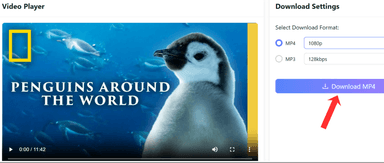
- Select Output Format: Choose your desired container (MP4 for video, MP3 for audio) and resolution. Unlike basic tools, this supports high-definition extraction.

- Execute Download: Click the conversion button. The server processes the stream and sends the file directly to your device's default download folder.


Key Capabilities:
- Max Resolution: Supports extraction up to 4K (2160p) and 60fps, depending on the source file.
- Cross-Platform: Fully functional on mobile devices (iOS/Android) and all major desktop browsers (Chrome, Firefox, Edge).
- Safety: No software installation is required, eliminating the risk of bundled adware often found in free desktop executable installers.
Method 2: Paid Desktop Software To Fix YouTube Downloader Errors
If you're facing "403 Forbidden" errors or throttling with web-based converters, paid desktop software provides more stability.
Unlike free online tools, which rely on shared servers, desktop software processes files locally and gets regular updates to bypass YouTube's latest changes. It's ideal for power users needing bulk downloads, playlist extraction, or 8K support.
4K Video Downloader+ Tool Helps Troubleshoot and Fix YouTube Downloader Issues
4K Video Downloader+ is widely regarded as the industry standard for desktop downloading due to its dedicated update cycle and ability to handle complex tasks like parsing entire channels or extracting subtitles. It operates independently of browser limitations, ensuring consistent success rates.
Step-by-Step Guide to Using 4k Dowloader+ to Fix YouTube Download Problem:
- Installation: Download and install the software from the official 4K Download website. Launch the application.

- Configuration (Smart Mode): To speed up the process, toggle "Quality best " on. Select your preferred format (e.g., MP4) and quality (e.g., 1080p or 4K). This prevents the software from asking for settings for every single link.

- Copy Source: Navigate to the YouTube video, playlist, or channel you wish to save and copy the URL from the address bar.

Image source: Nerd Clips HD via YouTube
- Paste and Extract: Click the "Paste Link" button in the top left corner of the application. The software will automatically parse the clipboard data.
- If it is a single video, the download begins immediately based on Smart Mode settings.
- If it is a playlist, you will be prompted to select whether to download the single video or the entire collection.

- Completion: Once the progress bar finishes, the file is saved to your designated output folder.
Honorable Mentions & Alternative Tools to Fix Parsing and Downloading Issues
If 4K Video Downloader+ does not meet your specific workflow needs, two other professional tools dominate the market.
1. Internet Download Manager (IDM)
IDM is primarily a download accelerator that increases transfer speeds by up to 5 times using dynamic file segmentation. It is distinct because it integrates directly into browsers (Chrome, Firefox, Edge) via an extension.

- Process: A "Download this video" panel appears directly above the YouTube video player in your browser.
- Price: Approximately $24.95 for a lifetime license (1 PC).
- Pros: Extremely fast multi-threaded downloading; seamless browser integration; capability to resume broken downloads.
- Cons: Dated, utilitarian interface; strictly Windows-only (no native Mac version).
2. EaseUS Video Downloader

EaseUS is a robust alternative focused on user-friendliness and bulk management. It features a built-in browser, allowing users to search for and download videos without leaving the application.
- Price: Offers monthly subscriptions or a lifetime license (approx. $40).
- Pros: Built-in YouTube search; efficient batch processing; high-quality MP3 conversion tools included.
- Cons: More expensive than IDM for the lifetime license; free trial is heavily restricted (limited daily downloads).
Method 3: The Command Line Interface (The "Unbreakable" Method) to Fix YouTube Downloader Not Working
When standard "paste and click" downloaders fail, the Command Line Interface (CLI) remains the most reliable solution for technical users. While commercial Graphical User Interface (GUI) tools often wait days or weeks for developer patches, open-source CLI libraries are frequently updated by the community within hours of a YouTube algorithm change.
yt-dlp (The Modern Standard)

yt-dlp is a command-line media downloader and the active fork of the now-defunct youtube-dl. It is widely considered the "unbreakable" method because it includes specific patches to bypass YouTube’s throttling mechanisms and signature extraction errors.
Unlike web tools, it processes data locally, allowing for advanced features like geotagging, metadata retention, and automatically merging separate video/audio streams.
Step-by-Step Guide on How to Solve YouTube Downloader Issues:
- Install Python:
- Download the latest version of Python from the official website.
- Crucial Step: During installation, ensure you check the box labeled "Add Python to PATH". This allows you to run Python commands from your system terminal.
- Install yt-dlp:
- Open your Command Prompt (Windows) or Terminal (Mac/Linux).
- Type the following command and press Enter:
pip install yt-dlp
- The system will automatically download and install the latest dependencies.
- Download a Video:
- Once installed, downloading is executed via a simple command. Type yt-dlp followed by the video URL:
yt-dlp "https://www.youtube.com/watch?v=example"
- The tool will automatically select the highest quality video and audio streams, merge them, and save the file to your current user folder.
Key Technical Advantages:
- Throttling Bypass: yt-dlp implements techniques to circumvent YouTube's speed-limiting algorithms, which often cause other downloaders to stall.
- Format Selection: Users can specify exact formats (e.g., -f bestvideo+bestaudio) to ensure 4K or 8K resolution where available.
Alternative: JDownloader 2 (Java-Based GUI)

For users who want the power of an open-source engine but refuse to use a command line, JDownloader 2 is the primary alternative. It is a free, Java-based platform capable of handling thousands of downloads simultaneously.
- Pros: Completely free; supports "Link Grabbing" (copying a URL automatically adds it to the queue); excels at bulk downloading.
- Cons: Cluttered interface with a steep learning curve; installer occasionally bundles "adware" (users must pay close attention to decline extras).
Method 4: Browser Extensions (The Lightweight Workaround) to Fix YouTube Downloader Errors Quickly
Browser extensions are often the first option users try, but they're usually unreliable for YouTube. Since Google owns both YouTube and Chrome, the Chrome Web Store enforces strict rules against extensions that allow YouTube downloads. As a result, most "Video Downloaders" in the store clearly state they don’t work with YouTube.
To bypass this restriction, you must use User Scripts or sideloaded extensions that operate outside the official store environment.
Tampermonkey + Local YouTube Downloader
The most robust workaround is using a Userscript Manager like Tampermonkey. This extension acts as a container for scripts that modify how a webpage behaves. By installing a specific downloader script, you can force a download button to appear directly within the YouTube interface.
Step-by-Step Guide on How to Fix YouTube Downloader Challenges Using Tampermonkey + Local YouTube Downloader:
- Install the Manager: Go to the Chrome Web Store (or Firefox Add-ons) and install the Tampermonkey extension.

- Install the Script: Navigate to a reputable script repository like GreasyFork and search for "Local YouTube Downloader."

- Click Install this script, then confirm the installation in the Tampermonkey tab that opens.

- Download the Video: Refresh your YouTube video page. You will now see a "Download" link or button located directly below the video player (often next to the Like/Share buttons). Click it to select your resolution and save the MP4 file.
Alternative: Addoncrop

Addoncrop offers a more traditional graphical interface but cannot be installed with a single click due to the Chrome Store ban.
- How it works: You must download the extension from the Addoncrop website and install it manually (sideloading) or via their "Foxify" installer.
- The Catch: On Windows, Addoncrop typically requires the installation of a background "Helper Tool" executable. This is necessary to bypass browser security sandboxes and merge audio/video streams for 1080p+ downloads.
Method 5: Screen Recording (The Last Resort) to Overcome YouTube Downloader Problems
When standard extraction methods fail due to aggressive DRM (Digital Rights Management) or encrypted streams, the only remaining solution is screen recording. This method bypasses the need to parse YouTube’s backend code entirely. Instead of requesting the file from the server, you simply capture the visual and audio output directly from your display.
OBS Studio
OBS Studio is the industry standard for high-fidelity recording without watermarks. It allows for specific window capturing, ensuring you record only the video player and not your entire desktop.
Brief Step-by-Step Guide to Using OBS Studio:
- Configure Source: Open OBS, go to the Sources dock, click the + icon, and select Window Capture. Choose your browser window (e.g., Chrome/Firefox).

- Audio Setup: Ensure Desktop Audio is active in the Audio Mixer panel to capture the video's sound.

Image source: Netflix via YouTube
- Record: Click Start Recording in OBS, then immediately press play on the YouTube video.

- Finish: Once the video ends, click Stop Recording. The file will be saved locally (usually as MKV or MP4).

The Trade-Offs: While this method is "unbreakable," it requires a 1:1 recording time (a one-hour video takes one hour to capture) and quality is limited to your monitor's resolution.
Feature Comparison Matrix of Various YouTube Video Downloader
| Method | Stability | Cost | Max Resolution | Difficulty | Best For |
|---|---|---|---|---|---|
| Lynote AI Online Web-Based Tool | High (Server Updates) | Free | 4K | Very Low | Instant, single-video downloads without installation. |
| Paid Software (4K Downloader+) | High | $15-$25 | 8K | Low | Bulk downloading playlists and subtitles. |
| CLI Tools (yt-dlp) | Unbreakable | Free (Open Source) | Source Quality | High | Tech-savvy users and data archivists. |
| Screen Recorder (OBS) | Guaranteed | Free | Screen Dependent | Medium | DRM-protected content or live streams. |
Key Takeaways:
- Best Overall Balance: The Lynote AI Online Web-Based Tool is recommended for 90% of users. It bypasses local IP throttling and "403 Forbidden" errors by handling the conversion on remote servers, delivering high-quality files instantly without costing a dime.
- Best for Archiving: If you need to download hundreds of videos at once, invest in Paid Desktop Software or learn to use yt-dlp.
- Last Resort: Only use OBS Studio if the video is encrypted or strictly protected, as the process is significantly more time-consuming.
Frequently Asked Questions
Why does it say "HTTP Error 403 Forbidden"?
This error signifies that the YouTube server has explicitly rejected your request, usually due to expired links or IP flagging where algorithms detected script-based traffic. This is the primary indicator that your software is outdated and failing to generate fresh authentication tokens.
Why is the audio missing from the video file?
If you download videos in 1080p or higher, you may encounter files with no sound due to DASH (Dynamic Adaptive Streaming over HTTP). YouTube stores high-resolution video and high-quality audio as two separate streams to save bandwidth. You need software capable of "Muxing" (multiplexing), like yt-dlp or paid desktop tools, which automatically merge both tracks into a single MP4 file.
Can I download YouTube videos on my phone?
Yes, you can download YouTube videos on your phone using apps like Lynote AI, which work on both Android and iOS devices. Alternatively, some third-party apps allow for video downloads, though many require a subscription for full functionality.
Why is the download speed so slow?
YouTube actively throttles bandwidth for traffic that does not behave like a human viewer. If the server detects a third-party downloader, it may restrict the download speed to a few kilobytes per second (often under 50Kbps). Effective software circumvents this by using multi-threaded downloading or mimicking browser headers to appear as a legitimate user.