
Where Do Youtube Downloads Go: From Hidden Caches to Hard Drives
Few things are more frustrating than watching a download progress bar hit 100%, only to realize you have no idea where the file actually went. You check your desktop, scour the "Documents" folder, and run system searches, yet the video seems to have vanished into a digital void.
This confusion stems from a simple fact: YouTube does not use a single standard download folder for every type of download. According to YouTube's official help center, over 2 billion monthly logged-in users engage with videos, but only Premium subscribers can download for offline viewing, yet these files aren't stored like regular downloads.

The location of your download depends entirely on the method used to acquire it. There is a technical distinction between "saving" a video for offline viewing via the official app and "downloading" a raw media file via third-party tools.
YouTube says offline videos are stored encrypted on the device and can only be played inside the YouTube app. That format lives in protected folders and does not appear as a normal MP4 file. Browser or software downloads behave like normal files, so they save to a visible folder you can access.
This guide shows where each method stores your YouTube video, including Android and iOS app storage, browser download locations, and software output folders on Windows and Mac.
1. The Official YouTube App: The Hidden Files Why Downloads Are Not MP4 Files
Method: Tapping the "Download" button within the YouTube App (Premium Subscription).
The most common misconception among YouTube Premium subscribers is that hitting the "Download" button saves a standard video file (like an MP4) to their device. This is incorrect. When you use the official YouTube app, you are not downloading a standalone media file; you are caching an encrypted data stream.
To protect copyright and prevent piracy, Google utilizes Digital Rights Management (DRM). Instead of a single playable file, the video is split into multiple proprietary chunks—often recognizable as .exo files or generic binary blobs—that are locked to your specific device and Google account.
Where Are My Downloaded YouTube Videos and Where Do the Files Go?
YouTube downloads stay inside the YouTube app. YouTube stores them in hidden system folders, using a proprietary, protected format, often split into small data chunks, so you cannot open or copy them as MP4 files. To view them, open YouTube, tap You, then Downloads. Clearing app data removes them on your device only.
Android Path: Where Do YouTube Downloads Go on Android and How Do You Find Them?
YouTube downloads on Android stay inside the YouTube app, not in a normal phone folder. To find them, open YouTube and go to Library, then Downloads, or tap your profile, then Downloads. The saved files stay hidden and encrypted for app only access. You can manage download storage in YouTube Settings.
- Standard Directory Path:
/Android/data/com.google.android.youtube/files/offline/
If you navigate to this folder, you will not find recognizable filenames like funny_cat_video.mp4. Instead, you will encounter a complex hierarchy of folders labeled with random alphanumeric strings (e.g., r3, v9, or hashed IDs).
Inside these folders are the fragmented .exo files. Even if you copy these files to another Android device or PC, they will not play because the decryption key is stored deeply within the YouTube app's secure storage on the original device.
iOS: The "Sandboxed" Filesystem
Finding these files on an iPhone or iPad is significantly more difficult due to Apple’s strict "sandboxing" architecture. The iOS file system prevents users (and other apps) from accessing the internal data folders of installed applications. The content is stored deep within the YouTube app’s container and is effectively invisible to the native "Files" app.
The Only Way to View YouTube Premium Downloads Inside the YouTube App
Since the raw files are encrypted and hidden, the only method to access YouTube Premium downloads is through the application's proprietary interface:
- Open the YouTube App.

- Tap the You or Library tab in the bottom right corner.

- Select Downloads.


Crucial Limitation: These downloads are temporary. You must reconnect the device to the internet at least once every 29 days to verify your Premium subscription status, or the encrypted files will become inaccessible.
2. Browser Method for Downloading YouTube Videos Without Installing Any APP
Method: Using online converters or web-based tools like Lynote AI via Chrome, Firefox, or Edge.
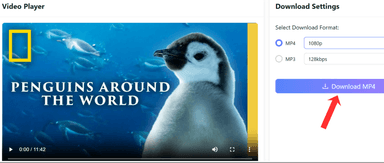
If you want a YouTube video saved as a real video file on your device, use a web-based tool like Lynote AI in your browser. This avoids YouTube app downloads, which stay encrypted and locked inside the app. Browser downloads save to a clear location, often your Downloads folder, so the file opens outside YouTube.
With Lynote AI, you get simple, fast downloads with no installation required. It allows you to download videos in their original quality, providing an easy way to save and access content.
Unlike other web tools like Y2Mate, SaveFrom, or ClipConverter, which are often cluttered with ads and complicated download processes, Lynote AI ensures a smooth, ad-free experience. It’s shown to be the best for straightforward video downloads.
So, how do you enable a “Save As” prompt when downloading a YouTube video from web-based tools? Learn more about it below!
Default File Locations
In 90% of cases, the video saves directly to your operating system's default Downloads folder.
- Windows:
C:\Users\[YourName]\Downloads - Mac:
/Users/[YourName]/Downloads - Android/iOS: The 'Files' app or 'Downloads' folder.
How to Enable a Save As Prompt When Downloading a YouTube Video
To prevent files from getting lost in a cluttered Downloads folder, you can configure your browser to ask for a specific location every time a download is initiated. This allows you to manually place the video on your Desktop or an external hard drive immediately.
For Google Chrome and Microsoft Edge:
- Click the three-dot menu > Settings.

- Select Downloads on the left sidebar.

- Toggle "Ask where to save each file before downloading" to On.

For Mozilla Firefox:
- Click the hamburger menu > Settings.

- Under General > Files and Applications, select "Always ask you where to save files."

If a download finishes and you missed the notification, simply press Ctrl + J (Windows) or Cmd + Option + L (Mac) to open the browser's Download Manager and locate the file.
3. How to Download and Save YouTube Videos on Your Windows PC Using Professional Software
Method: Dedicated download managers like Internet Download Manager (IDM) or 4K Video Downloader.
To download and save YouTube videos to your computer, use professional software like Internet Download Manager (IDM) or 4K Video Downloader. Power users on Windows often rely on dedicated download managers for handling large libraries or 4K content. These tools offer control over file naming and folder organization, without hiding files in encrypted directories.
Internet Download Manager (IDM): The Best Free Tool for Downloading YouTube Videos
Internet Download Manager (IDM) is the gold standard for Windows users, utilizing dynamic segmentation to accelerate speeds by up to 500%.
- Default Path:
C:\Users\[YourName]\Downloads\Video
How to Set a Custom Output Folder: To prevent your system drive from filling up, you can re-route downloads to a specific drive:
- Open IDM, click Downloads > Options.

- Select the Save To tab.

- Under the "Category" dropdown, select Video.

- Click Browse to choose your target folder (e.g., D:\Media\YouTube_Archive) and click OK.

Honorable Mentions
- 4K Video Downloader+ ($25): Preferred for its Smart Mode. You configure the settings once (e.g., "Always download 1080p MP4 to E:\Videos"), and subsequent downloads happen instantly without prompts.

- EaseUS Video Downloader ($20): Excellent for bulk archiving. It can download entire playlists and automatically organize files into subfolders based on the playlist name.

4. How to Download and Save YouTube Videos on Your Mac Ecosystem Using Professional Software
Method: Mac-native tools like Downie 4.
Mac users often prioritize software that integrates seamlessly with the macOS design language. Unlike the utilitarian interfaces found in Windows, paid Mac software combines raw downloading power with polished aesthetics and "drag-and-drop" simplicity.
Downie 4: Makes Downloading Videos from the Internet very easy

Downie 4 is widely regarded as the premier video downloader for macOS, capable of handling 4K/8K resolutions without the overhead of browser converters.
- Default Path:
/Users/[YourName]/Downloads/Downie/
The Dock Workflow: Downie streamlines the process significantly. You simply drag a URL from Safari or Chrome and drop it onto the Downie icon in your Dock. The app processes the file in the background and saves it to the default folder. You can customize this path via Preferences > General > Destination.
Honorable Mentions
- PullTube ($19.99): Ideal for editors. Its standout feature is a built-in media trimmer that allows you to visually select and download only a specific clip from a long video.

- Airy ($19.95): Focuses on browser integration. It allows you to log in to YouTube within the software to download age-restricted or private videos that other tools cannot access.

5. How to Manage Files and Download Apps Across Devices on Android & iOS
Method: Downloading via a web browser (not the YouTube App) on mobile devices.
Managing files and downloading apps across Android and iOS is simple with cloud storage services like Google Drive, iCloud, or Dropbox. When downloading videos via browsers like Chrome or Safari, files don’t go into encrypted libraries; they land in user-accessible directories. Apps can be easily managed through Google Play or the App Store for seamless cross-device syncing.
Locating Files on Android
Android provides a file system similar to Windows.
- Open the File Manager (e.g., "Files by Google" or Samsung "My Files").

- Navigate to Internal Storage > Download.

- Standard video files (MP4/WebM) are stored in
/storage/emulated/0/Download.

Locating Files on iOS (iPhone/iPad)
Since the introduction of the Files app, iOS downloads are much easier to manage.
- Safari Download Manager: Tap the "Aa" icon or the downward arrow in the address bar to see recent downloads.

- Files App: Navigate to the Browse tab.

- Look under Locations for iCloud Drive > Downloads or On My iPhone > Downloads.

Pro Tip: For advanced organization, use Documents by Readdle. It creates a dedicated sandbox for downloads that is often easier to navigate than the native iOS structure, allowing for easy transfer to cloud storage.
Summary: Comparison and Key Takeaways
Choosing the right download method dictates whether you own the file or merely possess a temporary license.
Download Method Comparison Matrix
| Feature | Online Tool (Browser-Based) | YouTube Premium (Official App) | Professional Software (IDM / Downie) |
|---|---|---|---|
| File Type | Standard .mp4 or .webm | Encrypted chunks (.exo or .blob) | Standard .mp4, .mkv, or .ts |
| Playable Outside App? | Yes (Universal compatibility) | No (Must use YouTube App) | Yes (High-bitrate support) |
| Cost | Free (Ad-supported) | Monthly Subscription ($13.99/mo) | One-time License ($24.95$33.70) |
| Default Location | System "Downloads" Folder | Hidden App Sandbox / Internal Data | User-Defined (e.g., C:\Downloads\Video) |
Frequently Asked Questions
Can I move YouTube Premium downloads to an SD card?
Yes, but with limitations. You can change the storage location in the YouTube app settings to free up internal memory. However, the files remain encrypted .exo chunks, meaning you can't remove the SD card and play the videos on a PC or another device.
Why can’t I find the video file on my phone?
If you used the official YouTube app, the file is hidden in an encrypted directory accessible only via the app's "Library" tab. If you used a browser or a tool like Lynote AI, check the "Downloads" folder in your file manager for the video file.
Does downloading reduce video quality?
YouTube Premium downloads are often capped at 1080p. However, professional tools like IDM, Downie, or Lynote AI allow you to download the raw stream, providing full 4K quality without compression loss.
Can I transfer YouTube Premium downloads to my computer?
No, YouTube Premium downloads are encrypted and tied to the YouTube app. You cannot transfer them to a PC or any other device for playback outside the app.
Why can't I play my YouTube download on another device?
YouTube downloads are stored in encrypted files (.exo) that can only be played within the YouTube app on the original device, making it impossible to play them on other devices.